- Workwiz
- Posts
- ✨ 3 Ways ChatGPT can save HOURS
✨ 3 Ways ChatGPT can save HOURS
GPT-4o is powerful, and here's how to best use it

Jeroen Kwaad
June 06, 2024
In partnership with


It’s been a couple of weeks since the new GPT-4o model rolled out for both free and paid users, and it brings tons of exciting opportunities.
Everything I’m about to share is applicable to you, whether you are on the free plan or paid plan.
Let’s go over 3 use cases that can save you tons of time.
Today:
Advanced Data Analysis in minutes
Set a new default ChatGPT writing style that is not wordy and boring
Prepare better for job interviews and make better hires
Let’s get it.
Advanced Data Analysis
No more messing around, data analysis is now easier and more reliable than ever with GPT-4o.
Within seconds you can do a correlation analysis, segmentation analysis, trend analysis, and even generate (interactive) charts that you can edit and download.
There are only two things you need:
Clean data
Clean data means that your data file has the following attributes:
Clean and clear headers
One row per record
‘Raw’ data. So no filters or formulas applied
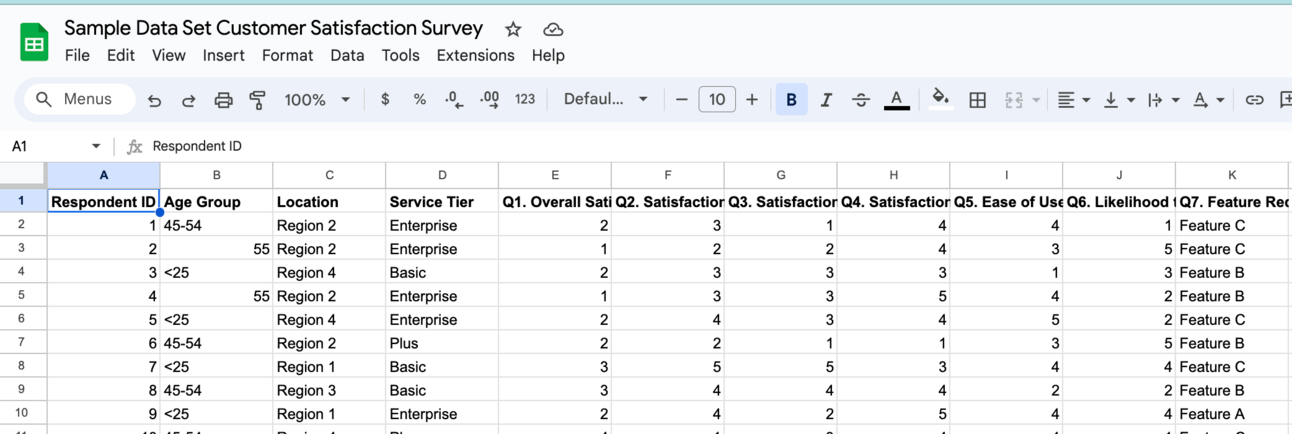
Example of clean and raw data
When you export data from a tool like Hubspot or Typeform, you (most of the time) get raw data, so it’s good to go.
If you want to see an example of clean data and follow along, here’s a Google Sheet you can download (export as CSV or .xlsx).
Here’s how you do quick data analysis in a couple of steps:
1/ Open the Advanced Data Analysis GPT
Visit this link to directly get access to the GPT. Regardless of your subscription type, it should be accessible.
2/ Upload your file
Upload your file that you want to get analyzed.
You don’t have to give a special prompt. Only submitting the file is enough.
It will automatically do a quick data exploration to see if ChatGPT can read the contents, and give you a quick summary of the contents to confirm its understanding the data you provided.

3/ Choose a specific type of analysis, or ask what you want answered
Once the initial data exploration is done ChatGPT will give you a couple of suggestions on the type of analysis it can do for you.
Of course you can deviate from these suggestions and just ask what you would like to know from the dataset.
4/ Optional: Visualize your findings
All the data analysis that ChatGPT does can be visualized in any type of chart you want.
Some charts are even interactive (like bar charts) and be customized.
You can download all charts that you generate instantly and place them in your email or presentation.

There are tons of opportunities. And if you are unsure of what’s possible with the data analysis GPT, you can always just ask the GPT itself.
It will suggest ways you can analyze it and how you can best visualize it.
New AI LeadGen Tool Identifies Email Address of Your Visitors

Did you know that you can Identify the email addresses of your anonymous website traffic?
Rather than getting only 5% of your traffic via an opt-in form, a new AI Tool, Smart Recognition, lets you target and email most of your website traffic, growing your email list and revenue faster!
How can this help? 👇
Capture email addresses of up to 40% of your anonymous traffic.
Email irresistible offers to prospects browsing your site.
Send abandoned cart emails to people who don't complete checkout.
Say goodbye to the default voice
The default writing style of ChatGPT is horrible and is absolutely something you should avoid.
You are not fooling anyone these days that you are using ChatGPT, but there are some ways you can bypass the default voice and sound more authentic.
My suggestion would be to pick one of the two options, and then apply it as your new writing style in your custom instructions.
It will save you time as you have to less often modify it to make it sound more natural.
1/ Apply the Power Writing Modifier
This is a simple modifier you can include in your prompts to make ChatGPT write more natural and human-sounding.
Here’s the prompt:
Use clear, direct language and avoid complex terminology.
Aim for a Flesch reading score of 80 or higher.
Use the active voice.
Avoid adverbs.
Avoid buzzwords and instead use plain English.
Use jargon where relevant.
Avoid being salesy or overly enthusiastic and instead express calm confidence.
It makes your writing more direct, less wordy, and way more natural.
The most important rule for writing is to ‘write like you speak’. And the problem with ChatGPT is that it often uses words you would never use in real life.
This prompt will counter that.
2/ Use your own voice
Another option is to make ChatGPT replicate your own writing style.
It won’t be perfect, but it will be better than the default voice.
It will also make it a lot easier for you to modify it to get to the right outcome.
You can make ChatGPT replicate your style in a couple of steps:
1/ Open the Writing Style Analyzer GPT
Go to this link and open the Writing Style Analyzer.
2/ Paste a chunk of your best writing
Try to find a big chunk of your best writing that you want ChatGPT to replicate and send it to the GPT.
It doesn’t have to be a whole essay, a couple of hundreds words will do the trick.
3/ Copy your writing style analysis
The analysis of your writing style is also a set of instructions that you want to copy completely, so that we can set it as your custom instructions.

Set your new custom instructions
Whether you go with the Power Writing Modifier or the analysis of your writing style, it’s time to say goodbye to the default ChatGPT style and update it with your new writing style.
1/ Open ChatGPT
2/ Click on your profile picture
3/ Click on ‘Customize ChatGPT’
4/ Paste the set of instructions in ‘How would you like ChatGPT to respond?’

Providing a set of custom instructions is a breath of fresh air. Enjoy not seeing words like ‘delve’ every few sentences.
Prepare any interview in minutes
Okay this is a quick one, but it’s too good and handy not to use it.
If you interview a lot of candidates then you know preparing and coming up with insightful and original questions is hard.
Well, not anymore.
Use the Candidate Preparer GPT to create recruiting magic. Here are some common scenarios and what to do.
Scenario 1: You are speaking to a candidate for the first time (culture-fit)
Open the GPT, and upload the resume of the candidate (for example a PDF) and a copy of the vacancy and instruct ChatGPT to come up with typical questions for a first round.
It will immediately create relevant questions based on the candidate and the resume. It will also look for connections between the two files. For example a lack of experience or an uncertain culture-fit.
Scenario 2: You need to assess the skills of the candidate
In this scenario you can open the GPT, and upload the resume and vacancy again, but this time you’ll instruct you need to assess the skills.
Based on the ‘qualification’ section of the vacancy, the GPT will come up with relevant and tough questions to assess the candidate thoroughly.
Scenario 3: You have a case-study interview
If you are speaking to a candidate to review a case study, then you can do the following. Open the GPT, upload the vacancy, the case study, and the case study instructions.
It will review the case study for you and immediately create a set of highly-relevant and critical questions.
Not only does it save you a lot of time, it will also help you better assess the skills of the candidates and hire better candidates in the end.
Enjoyed this newsletter? Forward it to a friend and have them sign up here.
What did you think of today's newsletter? |
See you next week!
Jerry