- Workwiz
- Posts
- 🤖 ChatGPT is stronger than ever
🤖 ChatGPT is stronger than ever
Massive updates, how to use ChatGPT vision, and our favorite AI tools

Jeroen Kwaad
November 09, 2023

Happy Thursday! Welcome to the very first edition of the Workwiz newsletter, your source for AI news to work smarter and get more done.
We have some explaining to do…
Some of you may have subscribed earlier this year when we were called aiGators, or you subscribed recently but hadn't gotten a newsletter yet. Not to worry - from now on, you'll get Workwiz emailed to you every Thursday. Now, let's get to the good stuff.
Here’s what we got today:
A recap of the huge updates from OpenAI’s DevDay
Powerful ways to use ChatGPT vision
Our favorite 5 AI Tools
News
OpenAI reveals major upgrades at DevDay
Last Monday’s OpenAI DevDay revealed some very exciting AI updates. While it was aimed at developers, there are exciting changes for everyone.
Here are some of the bits we are most excited by:
GPT-4 Turbo
OpenAI announced their newest upgrade to ChatGPT called GPT-4 Turbo. This upgrade lets you share way more context with ChatGPT, up to 300 pages(!). So next time you want get a summary of a 250-page PDF, it will be able to do so.
Knowledge update
GPT-4 now covers events up to April 2023 instead of ending in 2021. OpenAI promised more frequent knowledge refreshes going forward.
Custom ChatGPTs
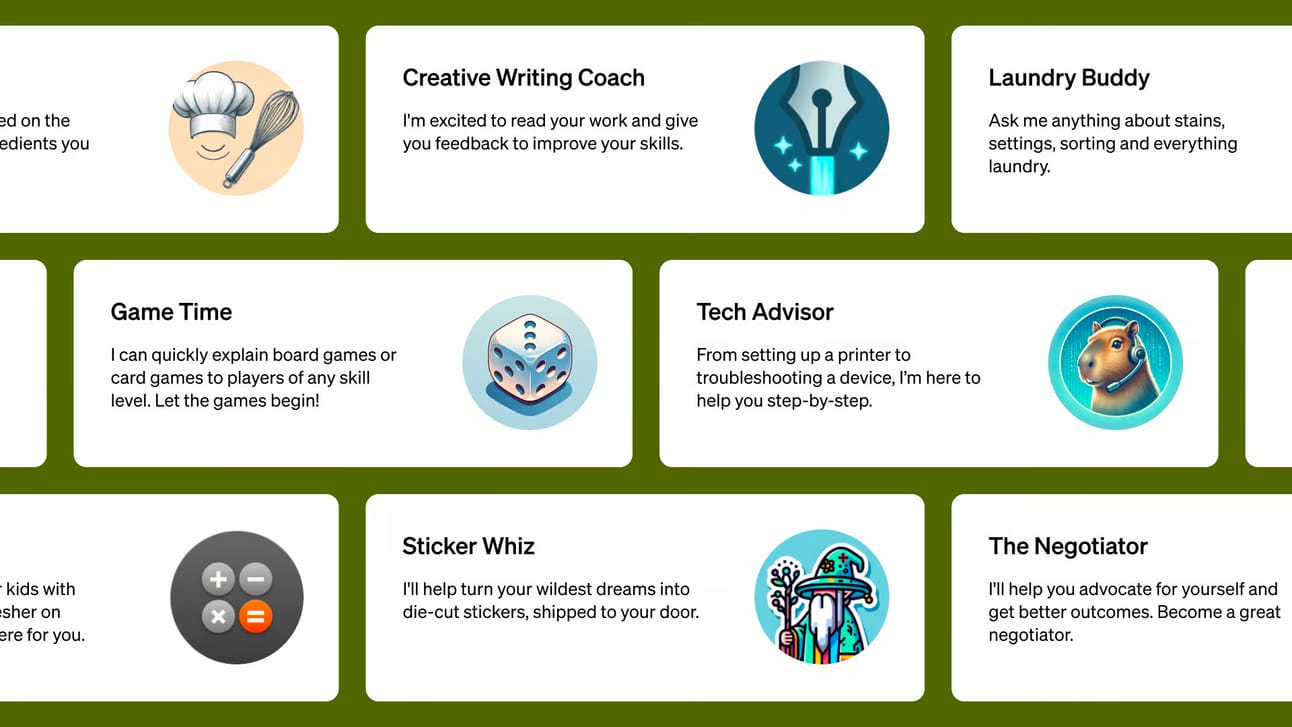
OpenAI is releasing a platform to create customized ChatGPT bots for specific uses. Called GPTs, you will able to start creating them yourself this week (it’s slowly rolling out).
No coding knowledge is required to make your own bot. You can simply instruct what it needs to do, and you can upload your own documents it can reference.
Explore and share GPTs
Later this month, OpenAI will open a store where users can share their own customized GPT chatbots. OpenAI will pay creators a share of revenue for the most useful and popular GPTs.
Check out OpenAI's post for full details, including all the updates for developers.
Highlight
ChatGPT Vision: a hidden superpower
Since September, ChatGPT has been able to hear, speak, and see. ChatGPT being able to hear and speak is pretty cool, but seeing is the real game-changer.

Here ChatGPT told me the Workwiz logo was from a publisher. Fortunately incorrect, but indeed similar.
Here are some powerful ways you can use ChatGPT vision:
The 5-second test
A five second test is a quick clarity test. When you suffer from the curse of knowledge, it’s hard to step in the shoes of someone that is completely unaware of your product.
With the 5-second test, you show someone your design, and after 5 seconds you ask what they think it’s about. You can easily do this with ChatGPT to get instant clarity on your messaging.
Upload your design, for example a webpage, ad, or a flyer and ask ChatGPT what it's about.
Define your target audience: ‘You are a 40-year old HR manager working at a large enterprise’
Ask ‘what did you saw?’, ‘who do you think this is for?’ or ‘what do you think this page/design is about?’
Get feedback on your designs
ChatGPT can give constructive design critiques like a human expert. Just upload your design and ask how to improve it visually.
Upload a screenshot or photo of your design
Instruct ChatGPT to be a designer: ‘You are a world-class digital designer that gives critical, but constructive feedback to improve the aesthetics of an design’
Ask ‘how can I improve this design? What elements can I improve?
Extract text from your whiteboards
No more manually retyping whiteboard notes. ChatGPT can transcribe text from photos of whiteboards or documents.
Take a photo of the whiteboard
Ask ChatGPT to transcribe everything from the photo
If relevant, you can ask ChatGPT to label the text per category and put it in a table.
How you can access ChatGPT vision
You need a ChatGPT plus account to access this feature. Go to GPT-4 and then click on the default version and you find the option to upload a photo.
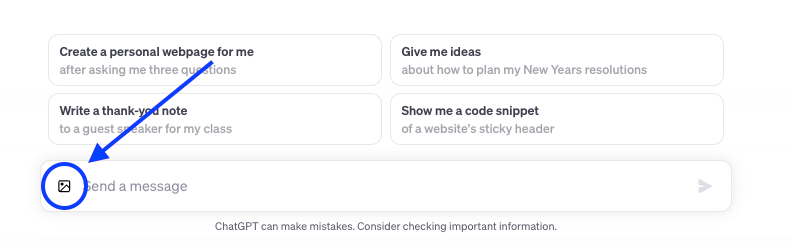
It’s awesome and you should definitely play around with it to explore what is capable.
Tools
In this section each week, we'll share tools we've recently launched or that have cool new updates.
Since this is our first edition, below is some of our favorite AI tools we use daily (besides ChatGPT which you likely already know and love).
 | Framer Create stunning websites in seconds with AI, no code required. |
 | Opus Convert longer videos into short and engaging clips with a single click. |
 | Perplexity Google 2.0: Search engine for fast, updated, and accurate answers to your requests. |
 | Elevenlabs Turn your text into realistic spoken audio instantly, or clone your own voice. |
 | Consensus Quickly find evidence-based answers from scientific research. |
That’s it for this week. If you want to stay up-to-date with AI while waiting for next week’s edition then I recommend for you to check out our website where we share daily new tools and guides.
What did you think of today's newsletter? |
Or just leave a reply to this email with your unfiltered feedback or questions — we read every email!