- Workwiz
- Posts
- Fine-tune your ChatGPT outputs with the LEVER prompt
Fine-tune your ChatGPT outputs with the LEVER prompt
This technique will improve your writing, brainstorming and more

Today I have a special guest-writer for the newsletter while I’m working hard on the Workwiz platform (early access invites coming next week!).
That’s right, today I have Moritz Kremb from The Prompt Warrior as a guest-writer. Moritz is an ex-consultant turned prompt engineer who became well-known for creating game-changing ChatGPT prompts.
And today is no exception—so stay tuned.
In today’s email:
The ChatGPT Lever Technique by Moritz Kremb.
Everything that happened in AI last week: news, tools, and more.

Hey everyone, Moritz here. And today I’ll share the most impactful prompt I’ve created to consistently create better results with ChatGPT.
It’s called The Lever Technique and it helps fine-tune your outputs and make it easier get to your ideal outcome.
Here’s what we’ll cover:
What is The Lever Technique
When and how to use it
Three examples of The Lever Technique in action

Often when you’re using ChatGPT (or any other LLM) you’ll find yourself in a situation where the output doesn’t fully match your expectations.
For example, I recently asked ChatGPT to write me “a short cold email pitching my ‘ChatGPT prompt improvement’ service”.
But it gave me an email that sounded too professional:

Now I might follow up with a prompt and say: “Can you make this email sound less professional?”.
But then ChatGPT swings too much in the other direction, making this email sound too casual:
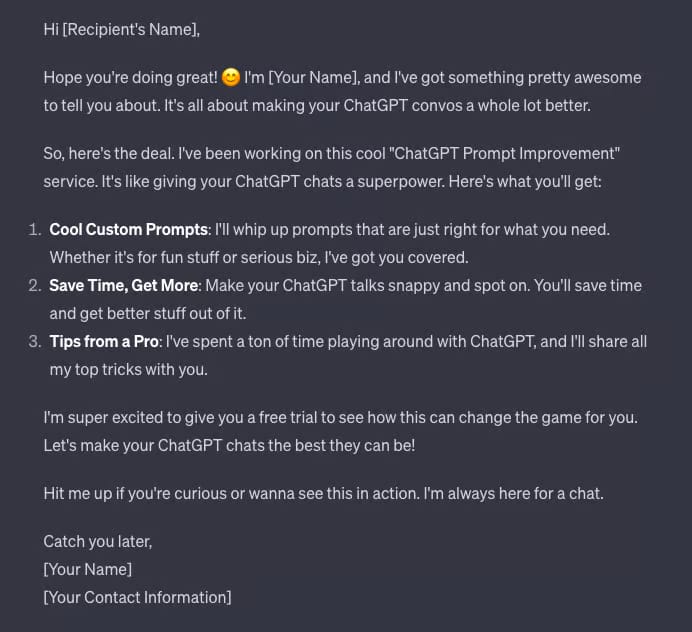
So what do you do in this case?
Here’s where The Lever Technique comes into play.
How do you use The Lever Technique?
The Lever Technique is a smart way that allows you to make adjustments to your AI outputs in a more fine-tuned way.
Essentially, it gets ChatGPT (or another LLM) to first evaluate its own output and quantify it.
With the quantified output, you can then adjust it very precisely according to your needs.
Here’s how it works:
You ask ChatGPT to rate its output on a scale of 1-10. You also define the scale, e.g. 1 is very casual, 10 is very professional.
ChatGPT will give you the answer (e.g. a 6/10)
You then adjust it to your desired number (e.g. a 3/10)
Let me show you how to use this on the example from above:

And this instantly gave me an email that sounded a lot more like how I wanted it to.

(Don’t worry, I’ll run through some more examples below).
Here is The Lever prompt template so you can easily copy and paste it:
"On a scale of 1-10.

If 1 is a ...

And 10 is a ...

How would you rate this ...?"
Ok, so far so good.
But now you might ask, why not just use this technique in the initial prompt? Something like this…

It does help slightly to do it this way, but I’ve noticed that letting the AI first evaluate its own output and then readjusting it, works so much better.
I guess it’s because the AI then has a better point of reference to fulfil your request.
Three examples of The Lever prompt in action
The Lever technique can be used for anything really. Let’s walk through a couple more examples.
Adjusting the writing style ✍️
When ChatGPT writes something, it usually uses a very formal tone by default.
Here I told it to write another email:

I then plugged in my Lever Prompt and told ChatGPT to rate its output on the scale:

After this, the email became the perfect amount of casual:

Creativity in brainstorming 🧠
Here I used The Lever Technique to make ChatGPT more creative in brainstorming.
I started with a simple prompt and the output was pretty standard:

Then I used The Lever Technique…

And voila! ChatGPT cranked up creativity and gave me much more unique ideas.

Image generation 🖼️
You can use this technique for image generation as well.
In this example, I asked ChatGPT for an image of two dogs fighting. Here’s what it came up with:

Then I used The Lever Technique…
(For images, ChatGPT protests that it is not ‘human’ enough to rate creativity, but that last line in the prompt will get it to do it anyway.)

I first told it to generate a 2/10, making it an even blander image:

Then I told it to generate a 10/10… here’s what it produced:

I think it’s fair to say that this was more creative.
And that’s all you need to know about The Lever Technique! I hope that was helpful and if you liked what you read, then please consider subscribing to my newsletter for more ChatGPT prompts.
— Moritz

🛠️ News and developments
Meta’s layoffs continue to impact advertisers as the company replaces account team members with AI
Nvidia Hardware is eating the world after stock triples in 2023 and is already up with 40% this year
Tim Cook says Apple will “break new ground” in generative AI this year
Mistral AI releases new model to rival GPT-4 and its own chat assistant
Mistral also received a $16M investment from Microsoft
Google CEO says Gemini AI diversity errors are ‘completely unacceptable’
Do you want daily AI news? Then subscribe to AI Tool Report—covering the latest AI developments daily.
Prefer more simplified breakdowns on where AI is headed from a genius? Then subscribe to simple.ai by Dharmesh, founder of Hubspot.
|

🛠️ New Tools
Phind - A faster way to search with sources
LTX Studio - Create and edit 100% AI-Generated videos
Persuva - Instantly create ads that convert
Supergrow - Grow your audience on LinkedIn with AI
Chatsimple - Copilot for your website visitor powered by AI

What did you think of this email?
You can add more feedback after choosing an option, or you can reply to this email directly.
What did you think of today's newsletter? |
If you enjoyed this newsletter, consider sharing it with a friend or colleague and have them sign up here.
See you next Thursday!
— Jerry